Tired of your LinkedIn™ posts getting too few reactions? Looking to achieve better visibility on the News Feed? Tagging on LinkedIn™ can help you with that. Easy to use and free, tags are your allies to boost the reach of your publication and generate reactions.
At Proinfluent, we believe that the power of LinkedIn™ should be accessible to everyone, which is why we reveal the good practices of tags on this network and their benefits.

Concretely, what is a tag and what is it for?
Tagging means mentioning someone (personal profile or company page) on social networks. This can be a single person or multiple users. Tags are used to exchange (message), offer content to the person of your choice (in comments), or to send a post of which you are the author, to one or more members (publication). To tag someone, type “@” on your desktop or mobile keyboard and select the names of the members you want. At this precise moment, the @ disappears and the name appears in blue on mobile, or in bold on desktop.
For example, you post a photo of you and your colleagues at a company meeting. Naturally, you mention the LinkedIn™ profile of each member present.

Tags provide several benefits on the LinkedIn™ social network :
- Hold the attention of the identified person(s);
- Obtain reactions in return, allowing you to boost the visibility of your publication ;
- Improve the reach and engagement rate of your posts;
- Attract new leads ;
- In b2b, mentions improve communication and bring friendliness between employees, while remaining in a professional setting.
How do I tag someone in a LinkedIn™ comment?
Mention a person in a comment from their mobile
Whether it is an image, a text, a video, a carousel , an article or a photo, there is the possibility of commenting on all the publications present on the LinkedIn™ social network. This is confirmed even if you are not part of the user’s circle of relations.
It’s almost the same procedure as on PC simply, when you touch “comment”, the “@” is permanently present in the small menu, below the space dedicated to writing your comment. It is positioned between the keyboard and camera icon.
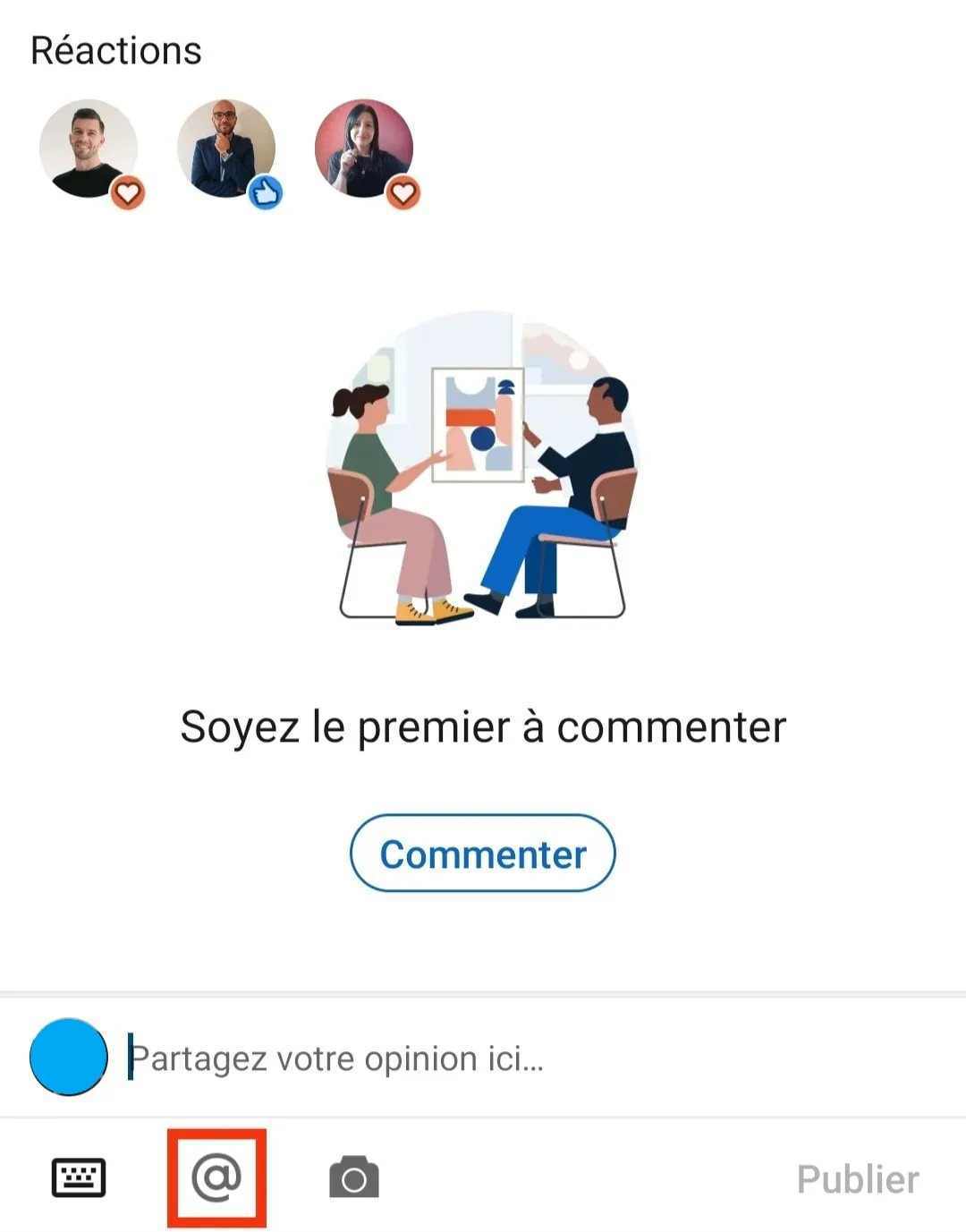
If you select it, the list of your contacts is revealed in alphabetical order. Same principle as on a computer, it is faster to enter the name of the person directly rather than looking for it in the list.
Tag someone in a comment from their computer
To tag a LinkedIn ™ profile in a comment, simply :
- Go to the publication you want to comment on and click on “comment”;
- Enter “@”, the list of your relations appears in alphabetical order;
- To find the profile or profiles that interest you more quickly, type the name of the person directly;
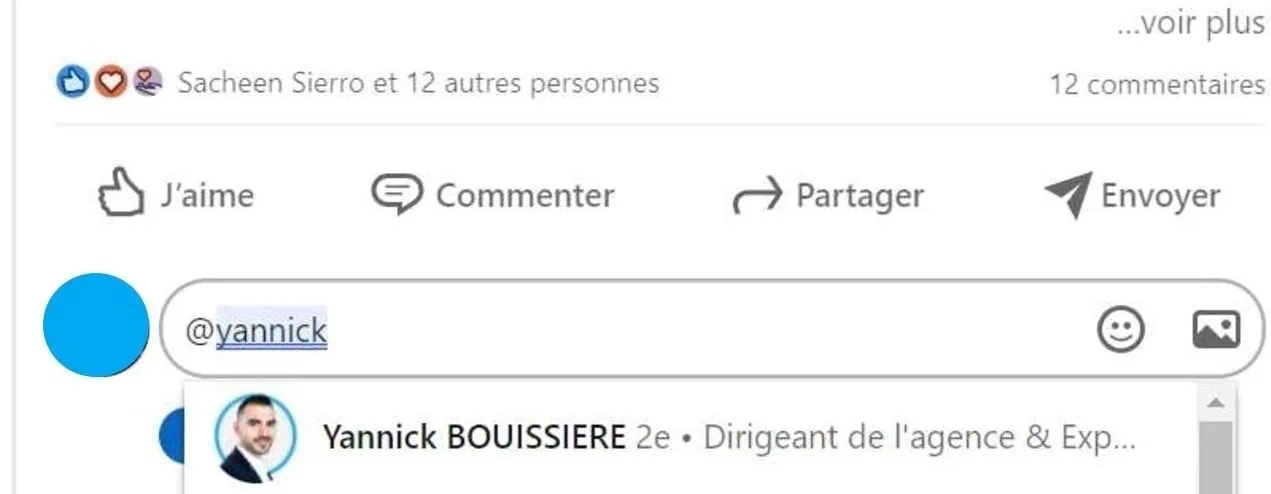
- All you have to do is select them by clicking on them, and you’re done! Note that the names then appear in bold and that the at sign disappears.
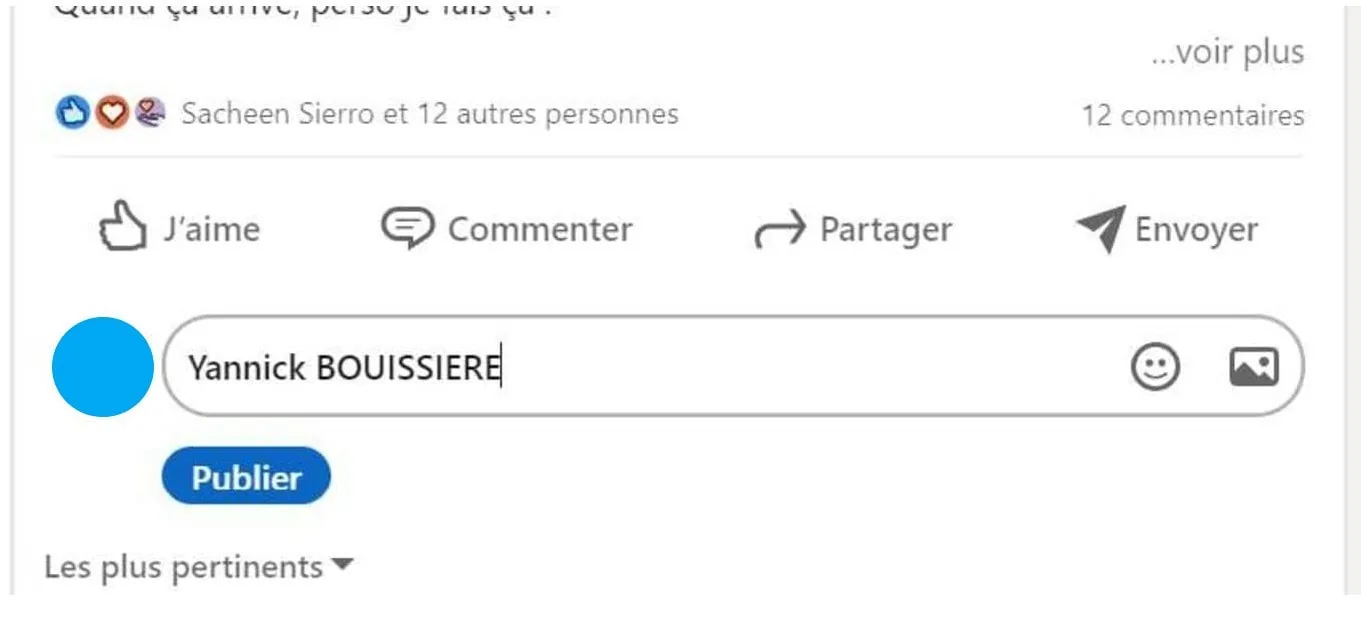
The person mentioned will then receive a notification to let them know that you tagged them in a LinkedIn™ comment or post. In addition, it is quite possible to tag a LinkedIn™ profile even if it is not part of your relationship!
How do I tag a LinkedIn™ member in a post?
Tag a LinkedIn™ profile in a post from your mobile
To tag one or more people in your LinkedIn ™ post , you must of course be the author of the post . Start with:
- Go to the “Post” section, which is located in the middle of the navigation menu, at the bottom of your screen;
- Write your post then add media to illustrate it;
- Enter the “@”, and start typing the name of your chosen targets, whether they are part of your network or not;
- When the mention is validated, the name turns blue on mobile. If it stays in black, it’s probably that the account no longer exists or that you misspelled your relationship. It is important to check this, so that your contacts receive a notification and react to your post;
- All that remains is to validate by clicking on “Publish”.
Tag someone in a LinkedIn™ post, from their browser
- Go to “Start a post” at the top of the home page .
- Write it as you see fit, then type “@” to tag a contact.
- Start typing its name, then select it when it appears.
- The names of the people then appear in bold. This criterion is essential for your contacts to receive a notification and for your post to generate strong engagement.
- Click on “Publish”, it’s done!
Best practices for tagging someone on LinkedIn™
How many tags to use?
The number of tags per LinkedIn ™ post is limited to 40. It may seem huge, however, in some cases identifying 40 people is legitimate. The ideal number of tags depends above all on the type of publication.
For a publication evoking a professional event for example, it is not shocking to mention 40 users. On the contrary, tagging the people present or who participate in the smooth running of the reception amounts to thanking them for their presence. This creates a climate of trust and friendliness.
In addition, if you want to tag the 50 relationships present in the photos of your post, you have the possibility of mentioning the last 10 directly in the comments.
To discuss a current event, tagging 40 people is not useful. If your content is likely to interest some of your relations, mention them but limit yourself to 5 relations at the most.
Similarly for an article or a text, tagging 1 or 2 users is more than enough.
Can I tag anyone on LinkedIn™?
Tagging on LinkedIn™ may seem innocuous, however, it is indeed a communication strategy . It is important to mention the right people, that is to say :
- Prioritize colleagues and good acquaintances;
- Choose active members on the network;
- Check that they react when other users tag them.
Also, make sure that the content is likely to interest them and directly concerns them. For example, a few days ago you discussed with your office colleague, Pierre, the new computer technologies that are about to be released. You decide to publish a post on the subject to unveil these new products to your network. Naturally, you tag Pierre who is interested in your post because he is looking for this information.

Do all tags have the same impact?
Depending on where they are placed, tags can change the visibility of your posts for good or bad. Indeed, tagging a connection in a comment or in a post does not have the same impact on LinkedIn™.
When you tag in comments, you take no risk. Whether the person responds or not, it does not affect you.
Conversely, in posts, tags can increase reach or decrease it. To do this, be careful not to mention just anyone, at the risk of devaluing your post and losing visibility.
People tagged must react within hours of your publication, otherwise it loses almost half of its reach! In addition, a like has no impact on this one, the users mentioned must therefore write a comment of more than 5 words so that the post benefits from better visibility (about 15% more).
Why tagging on LinkedIn™ can work against you
While tags help build your network and boost your posts on the LinkedIn™ feed, they can also have the opposite effect. The LinkedIn™ algorithm penalizes “bad” tags, that is to say :
- Those who get no response or reaction;
- Excessive tagging, if you mention 40 people in each post, for example, or if you tag relationships on a post that doesn’t concern them.
A user who abuses the tag reflects a lack of skill and misuse of this LinkedIn ™ feature or, alternatively, over-automation. This results for you in discredit on the social network. You lose your image as an expert and the trust of your network because you do not apply good tagging practices. In addition, your publications have very little reach since the tagged people do not react.
Need advice to be perfectly autonomous on LinkedIn ™ ? Make an appointment with a Proinfluent expert and master this network for years to come!
Tagging on LinkedIn™, to conclude
- The tag makes it possible to share or address content likely to interest your targets;
- On LinkedIn™ it can be used as a comment, a message or directly in a post;
- To tag someone, just type @ and type the name of the person to mention;
- When used well, the tag can increase the reach of its publication, attract new leads, strengthen professional links and retain the attention of the people identified;
- You must adapt the number of tags to each of your publications, but always use them sparingly;
- You don’t have to mention anyone to enjoy the benefits of tags. Make sure the topic interests the tagged profile;
- A tag in a comment does not impact the publication, while in a post, the tags can increase or decrease the visibility of this one;
- Abusive use of tags is penalized by the LinkedIn™ algorithm.
Tagging on LinkedIn™, to summarize in 4 questions
How do you tag someone on LinkedIn™?
To tag on LinkedIn™:
- Go to where you want to mention your contacts (content, comment), then type “@”;
- The list of your connections then appears in alphabetical order;
- Start typing the names of members to tag, then select them when LinkedIn™ suggests them in its search bar;
- On computer, the name then appears in bold while on mobile, it turns blue;
- Finish by clicking on “Publish”. Mentioned users instantly receive a notification to notify them of your action.
Why tag on LinkedIn™?
If used well, tags are beneficial for:
- Hold attention and elicit reactions;
- Increase the reach and engagement rate of your posts;
- Attract new leads.
Why can't I tag someone on LinkedIn™?
Some LinkedIn™ accounts may not be offered when you type the name after the “@”. Several reasons explain this:
- In a LinkedIn™ message, only people who are part of your network can be tagged;
- The person is not active on the social network;
- This is a foreign account;
- The account is no longer active;
- The name is misspelled.
How do you tag a company on LinkedIn™?
To tag a company, it’s the same procedure as to mention a person.
- Enter “@” where you want to mention the company (in comments or in a post). Your contacts are then displayed in the form of a scrolling list;
- Start typing its name and as soon as it appears, select it;
- On mobile, the name turns blue, on desktop it is bold;
- Click on “Publish”.
Source: LinkedIn™ algorithm